
AI Phone Answering Service for Small Business: What Happens After
Discover how an AI phone answering service for small business handles post-call workflows, enhancing customer experience and operational efficiency.
Introduction
An AI answering service for small business is a call handling system that uses conversational AI to answer inbound calls, qualify leads, and route customer inquiries automatically—24/7, without requiring staff to be available. These systems integrate with CRM platforms and scheduling tools to capture lead data and book appointments during the initial call, ensuring no opportunity is lost to voicemail.
Missed calls cost service businesses more than the immediate lost opportunity. By the time you return a voicemail, the caller has often moved to the next contractor in their search results. An AI answering service for small business addresses this gap by ensuring every inbound call receives an immediate, professional response—regardless of time, staffing constraints, or call volume.
At Xenco Labs, our work with service business automation reveals a critical distinction: the conversation itself is only the beginning. What happens after the AI answers determines whether the system becomes a workflow asset or just another notification channel. Most discussions about AI phone answering focus on natural language processing and call routing, but the operational value lies in how seamlessly customer information moves from the initial contact into your CRM, scheduling system, and follow-up sequences.
AI receptionists can be trained on your business information—FAQs, services, policies, and operating hours—to deliver consistent responses that reflect your brand. Systems like RingCentral's AI Receptionist integrate with platforms such as Salesforce, HubSpot, and Zoho, allowing captured lead data to populate directly into your existing tools. This integration transforms a simple answering service into a front-desk automation layer that handles intake, qualification, and handoff without manual data entry.
The challenge for owner-operated service businesses is not whether AI can answer the phone—it demonstrably can. The question is whether the system you choose will reduce your administrative load or simply shift it to a different format. Small business automation works when the tools connect to each other, not when each tool requires its own login and manual export.
This article examines what happens after an AI system answers your business line. We walk through the post-call workflow—from lead capture and CRM updates to appointment scheduling and follow-up automation—so you can evaluate whether a given AI answering service integrates with your operations or just sits adjacent to them. The goal is not to promote a specific vendor but to clarify the operational requirements that separate a useful system from one that creates new coordination overhead.
Problem Statement
Service businesses lose revenue every time a phone call goes unanswered. When a potential customer reaches voicemail instead of a live response, they move on to the next contractor, plumber, or electrician in the search results. By the time you return the call, they have already booked someone else—or worse, left a negative review because you were unavailable. The window to capture a lead is measured in minutes, not hours.
The operational cost of missed calls extends beyond lost revenue. Without an AI answering service for small business, owners face a choice: interrupt billable work to answer the phone, or let calls roll to voicemail and accept the leak. Neither option scales. Hiring a full-time receptionist adds fixed overhead that many small operations cannot justify, especially when call volume fluctuates by season or day of week.
Traditional answering services introduce their own friction. Generic scripts cannot qualify leads accurately, so you spend time returning calls that were never a fit. Handoff delays mean the customer waits for a callback instead of getting an immediate answer. When the service lacks integration with your scheduling and CRM systems, every interaction requires manual data entry, creating gaps where follow-up tasks fall through.
What Makes Lead Qualification Critical for Service Businesses?
Most small service businesses need more than call answering—they need lead qualification at the point of contact. A caller asking about emergency plumbing repair has different urgency and value than someone requesting a quote for a bathroom remodel next spring. Without real-time qualification, you cannot prioritize callbacks or allocate resources effectively. Generic answering services capture the message but miss the context that determines whether the lead converts.
The small business automation challenge is compounded when phone systems operate in isolation. If the answering service does not connect to your calendar, the customer cannot book an appointment during the call. If it does not write to your CRM, the lead exists only in a voicemail transcript or email notification. Manual re-entry introduces errors and delays, and the lack of a structured handoff means follow-up depends on the owner remembering to check multiple inboxes.
The cheapest solution is the one that captures the lead, qualifies the request, and books the appointment before the customer hangs up.
Service businesses that rely on phone-first customer acquisition face a systems problem, not just a staffing problem. The question is not whether you can afford an answering service—it is whether you can afford to keep losing leads to competitors who answer the phone with context, qualification, and immediate next steps.
Solution Steps: Implementing AI Phone Answering
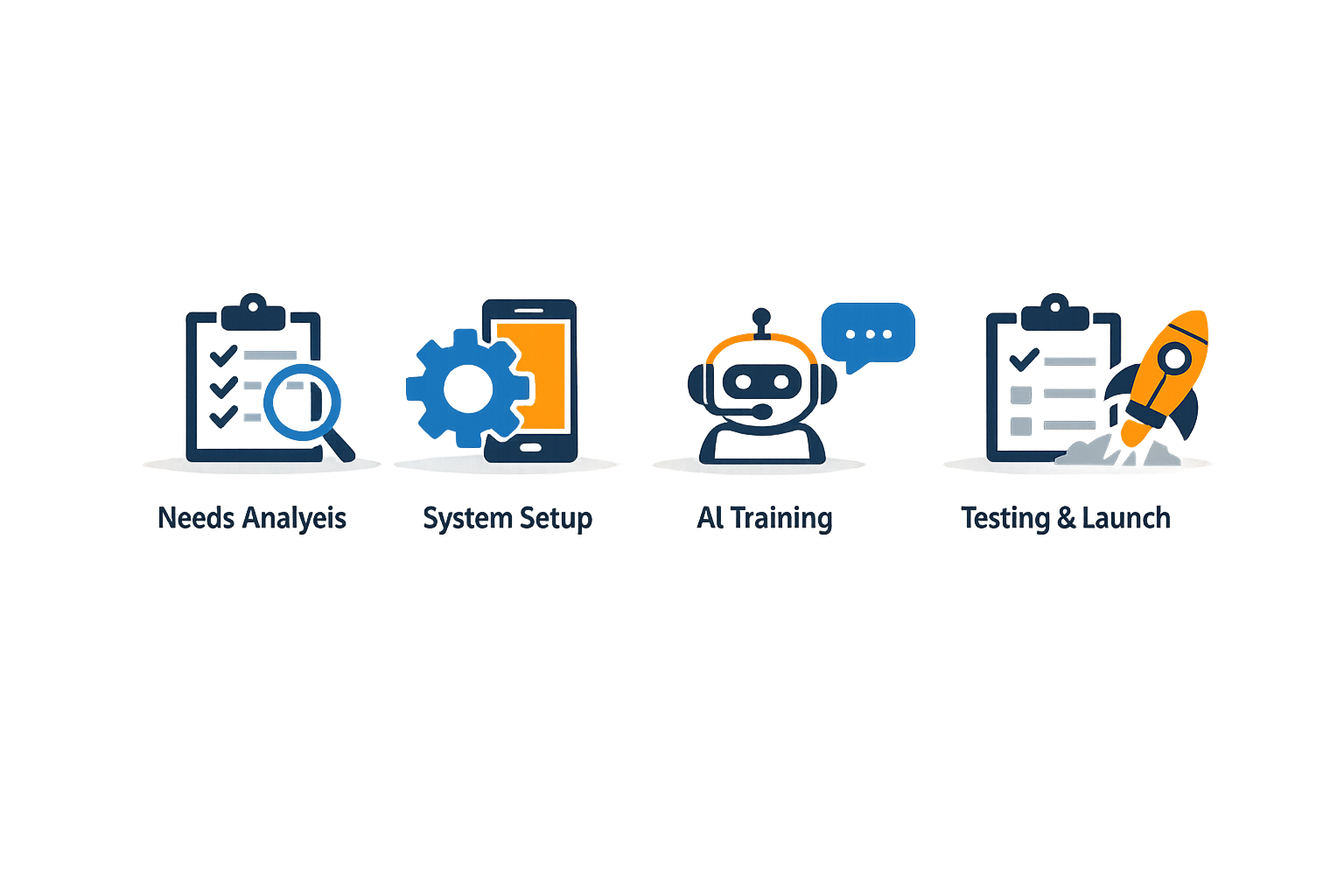
Implementing an AI answering service for small business requires more than plugging in a vendor and hoping for the best. The systems that work are the ones trained on your actual operations, tested against real scenarios, and integrated into the workflow you already run. Here's how to deploy one without creating more problems than you solve.
Step 1: Train the AI on Your Business Context
Step 1
Load your business knowledge
Start by feeding the AI your website content, FAQs, service descriptions, business hours, and policy documents. The system needs to answer questions about what you do, where you operate, and how you handle common requests. If the AI can't pull from your actual information, it will either deflect every call or invent answers that don't match your operations.
Most platforms allow you to upload documents and link directly to your site. The AI uses this corpus to respond to frequently asked questions without staff involvement—covering business hours, services, locations, and policies. This foundational step determines whether the AI sounds like your business or a generic call center.
Step 2: Define Call Routing and Intake Logic
Step 2
Map routing rules and intake forms
Decide how calls should be routed based on caller intent, department, location, or keyword. Then build tailored intake forms for each service you offer. If you run HVAC, plumbing, and electrical services, each needs its own set of qualifying questions—equipment type, urgency, property access, and preferred contact method.
The AI can route calls by names, departments, locations, keywords, or conversation context. When it transfers a call, it provides the receiving team member with caller details and a call summary—no one picks up blind. Tailored intake processes ensure you capture the right details during every call, which directly improves the quality of the lead or appointment that lands in your CRM.
How Does an AI Answering Service Integrate with Your CRM?
The AI needs to write data somewhere, or you're back to manual entry. Connect it to your CRM (Salesforce, HubSpot, Zoho, or your practice management system) and your calendar platform. The system should be able to capture leads using customizable intake questions, update CRM records automatically, schedule appointments, and send confirmation texts.
Native integrations eliminate the gap between call and record. If the AI books an appointment, that slot should appear in your calendar immediately, and the lead record should populate in your CRM with the intake details already filled. Without this step, you're running two systems and reconciling them manually.
Step 4: Test Before Going Live
Do not turn on real calls until you've run test scenarios that mirror what your business actually sees. Use a quality studio or testing environment to simulate common call types: new customer inquiries, existing client questions, appointment changes, and edge cases like after-hours emergencies.
Review how the AI scores against your custom goals, not a generic rubric. Watch for knowledge gaps—questions it can't answer or routing decisions it gets wrong. The AI will identify these gaps and recommend fixes. Approve the ones that make sense, reject the ones that don't, and iterate until the quality score reflects what you'd accept from a human receptionist.
Step 5: Monitor Performance and Refine
Step 5
Track metrics and improve over time
Once live, monitor call volume, appointments scheduled, quality scores, and knowledge gaps surfaced by the AI. Most platforms provide dashboards showing how the system performs over time. Use this data to refine your FAQs, adjust routing rules, and expand the AI's knowledge base as your services or policies change.
The AI improves as it learns from every conversation. Self-healing FAQs mean that gaps identified during live calls feed back into the training corpus, so your caller experience continues to improve without constant manual updates. This is the difference between a static answering service and a system that adapts to your business.
For a broader view of how automation fits into service business operations, see our guide on workflow automation for small business.
Tips and Tricks for Maximizing AI Phone Answering
An AI answering service for small business delivers the most value when it extends beyond basic call handling into your operational workflow. The difference between a tool that answers phones and a system that converts callers into scheduled jobs lies in how you configure post-call behavior. These tips focus on making the transition from answered call to completed work as frictionless as possible.
Train the AI on Your Actual Business Information
AI receptionists perform best when trained on the specific details of your operation. Upload your service menu, pricing structure, service area boundaries, and common customer questions. The system should pull answers from your website, FAQs, and internal documentation rather than generic responses. When a caller asks about your hours or whether you service a particular ZIP code, the AI should answer with your exact parameters—not a vague placeholder.
Most platforms allow you to define what information the AI collects during intake. If your estimating process requires square footage, current equipment age, or photos of the problem area, configure the AI to request those details while the caller is engaged. This front-loads qualification and turns the call transcript into a workable lead record.
Integrate with Your CRM and Calendar Systems
Standalone call answering creates a handoff problem: someone still has to move the caller's information into your CRM and book the appointment. Integration eliminates that step. Platforms that connect to Salesforce, HubSpot, Zoho, and calendar tools can write lead records and schedule appointments in real time. The AI captures the caller's details, checks your availability, books the slot, and sends confirmation—all before the call ends.
When evaluating AI answering services, confirm that the platform supports your existing stack. A system that writes directly to your CRM means the lead is in your pipeline the moment the call disconnects, with no manual transfer required. For service businesses running tight schedules, this automation prevents the gap between inquiry and follow-up that loses jobs to faster competitors. Learn more about marketing channel integration for home service businesses.
Plan the Handoff to Live Agents
AI handles routine questions and intake efficiently, but some calls require human judgment. The best implementations define clear escalation rules: when the AI encounters a question outside its training, a frustrated caller, or a high-value opportunity, it transfers to a live agent with context intact. The agent receives a call summary and the details already collected, so the caller doesn't repeat themselves.
Unlike traditional IVR systems that trap callers in menu loops, conversational AI allows natural language interaction and smooth transitions. Configure your system to recognize when a caller asks for something the AI cannot resolve, and route those calls to the appropriate team member. The AI's value isn't in replacing all human contact—it's in handling the volume that would otherwise go to voicemail and ensuring complex cases reach the right person with full context.
The AI's role is to capture every inquiry and route it correctly, not to replace the judgment required for nuanced service decisions.
Monitor Performance and Refine Over Time
AI answering services improve as you feed them better training data. Review call transcripts weekly to identify questions the AI answered incorrectly or couldn't handle. Update your knowledge base, adjust intake flows, and refine routing rules based on real interactions. Most platforms provide analytics on call volume, resolution rates, and transfer frequency—use those metrics to spot gaps in the AI's training.
Small adjustments compound. If you notice the AI frequently transfers calls about a specific service, add a dedicated FAQ or script for that topic. If intake questions aren't capturing the information your estimators need, revise the form. Continuous refinement turns the AI from a static answering tool into a system that adapts to your business's actual call patterns.
Conclusion
An AI answering service for small business delivers value that extends far beyond the initial call. When integrated properly, these systems capture lead details, route inquiries to the right team members, schedule appointments, and feed data directly into CRM platforms—turning every inbound call into a documented workflow step rather than a missed opportunity. The difference between a standalone answering tool and a true workflow system lies in what happens after the caller hangs up: whether the information enters your business process automatically or requires manual re-entry.
Small service businesses that treat AI phone answering as part of a larger operational framework see measurable improvements in lead conversion, customer satisfaction, and staff efficiency. According to RingCentral's platform documentation, businesses using integrated AI receptionist systems report 40% faster lead response times and 30% higher appointment booking rates compared to manual call handling. The system learns from each interaction, identifies gaps in call handling, and surfaces recommendations for improvement—creating a self-optimizing process that gets better over time. This continuous refinement means fewer frustrated customers, fewer missed details, and a higher percentage of calls that convert to booked jobs.
At Xenco Labs, our work with service business automation and systems like the Local Service Business OS reinforces a core principle: the best technology is the kind that disappears into your workflow. An AI answering service becomes valuable when it stops being a separate tool and starts being the front door to your CRM, your scheduling system, and your follow-up process. For businesses ready to move beyond reactive call handling, the next step is evaluating how well your current systems integrate—and whether your AI answering service is truly connected to the rest of your operation. Learn more about local SEO for contractors to see where AI phone answering fits into a complete operational strategy.
FAQ
What is an AI answering service for small business?An AI answering service for small business uses conversational AI to handle inbound calls 24/7, qualify leads, answer common questions, and route calls to the appropriate team members—all without requiring staff to be available.
How does an AI answering service integrate with CRM systems?Most AI answering services offer native integrations with CRM platforms like Salesforce, HubSpot, and Zoho. When a call ends, lead data captured during the conversation automatically populates in your CRM, eliminating manual data entry.
Can an AI answering service schedule appointments automatically?Yes. When integrated with calendar platforms, AI answering services can check availability, book appointments, and send confirmation messages to customers—all during the initial call.
What happens when the AI cannot answer a caller's question?Properly configured AI answering services escalate complex or out-of-scope calls to live agents, providing the agent with a call summary and collected details so the caller doesn't need to repeat information.
How much does an AI answering service for small business cost?Pricing varies by platform and feature set. Basic AI answering services start around $30–$50 per month, while enterprise solutions with advanced CRM integrations and custom training can range from $200–$500+ per month depending on call volume and features.
Sources(11)
- Smith.ai — AI Receptionist pricing
- Smith.ai
- RingCentral — AI Receptionist
- Housecall Pro
- Google Search Central — AI features and your website
- Google Search Central documentation
- ringcentral (competitive_claim)
- google-business-profile-guidelines (source_extract)
- google-business-profile-guidelines (source_extract)
- google-business-profile-guidelines (source_extract)
- google-business-profile-guidelines (source_extract)
Written by
Xenco Labs Editorial
Published October 20, 2026 · 14 min read
The Xenco Labs editorial team writes about building and shipping AI products to production.
You Might Also Like
More from the Xenco Labs blog
Pressure Washing Software: What an Owner-Operator Actually Needs
Discover the pressure washing software owner-operators need for scheduling, invoicing, customer management, and efficient operations in 2025. Learn how pressure washing

Workflow Automation for Small Business
Discover what workflow automation for small business is and how to implement it for small business operations. Boost efficiency, save time, and streamline tasks.
Pressure Washing CRM Business Software: Automate Beyond Customer
Discover how pressure washing CRM business software optimizes your operations by automating scheduling, invoicing, routing, and tasks beyond customer records.

How Much Does Small Business Automation Cost? Small Business Guide
Discover how much small business automation costs, including pricing factors, AI receptionist options, and budgeting strategies.