Pressure Washing CRM Business Software: Automate Beyond Customer
Discover how pressure washing CRM business software optimizes your operations by automating scheduling, invoicing, routing, and tasks beyond customer records.
Introduction
Pressure washing business software built for automation changes the operational equation for service companies. Instead of a passive database, the system becomes the operational backbone: it assigns jobs based on crew location and equipment inventory, generates surface-specific checklists so soft-wash jobs don't get treated like concrete cleans, sends payment reminders tied to invoice aging, and surfaces upsell opportunities when a driveway customer also has a moss-covered roof. When customers can book their own appointments and approve proposals without a phone call, the owner's calendar opens up and the sales cycle compresses from days to hours.
Most pressure washing operators treat their CRM as a digital Rolodex: a place to store contact cards and maybe log a few notes after each job. That approach leaves the hardest operational work—scheduling around weather, routing trucks efficiently, sending invoices that actually get paid, ensuring the crew brings the right nozzles for each surface—entirely manual. The result is administrative drag that scales linearly with revenue, capping growth long before equipment or labor becomes the bottleneck.
This is not about features on a vendor comparison chart. It is about small business automation that reduces the cost of coordination to near zero, so adding the next truck or the next service area does not require hiring another dispatcher. The pressure washing businesses that scale profitably are the ones that automate the tasks between the initial call and the final payment—not the ones with the fanciest customer record fields.
The bottleneck in a growing pressure washing business is rarely the number of jobs you can book—it is the number of jobs you can coordinate without errors.
Automation solves coordination. The sections that follow walk through the specific problems manual CRM workflows create, the steps to automate them systematically, and the operational tricks that make automation stick. If your current system still requires you to remember which crew has the surface cleaner or manually calculate drive time between jobs, the gap between where you are and where automation can take you is measurable in hours per week and margin points per job.
Problem Statement
Most pressure washing operators run their business through a patchwork of tools: a spreadsheet for scheduling, a phone app for invoicing, a notebook for site notes, and memory for everything else. The system works until it doesn't — until a callback gets missed, a quote expires untracked, or a crew shows up with the wrong equipment because the surface type wasn't documented. The cost isn't always visible in the moment, but it compounds: rework trips, customer churn, and the operator's time spent reconciling what should have been captured automatically.
The gap isn't in customer relationship management as traditionally defined — most operators know their customers well enough. The gap is in operational intelligence: knowing which surface gets which treatment, tracking service history so you can price renewals accurately, and routing crews without burning half a tank driving back for a forgotten pump. Without automation in these areas, the business runs on the operator's recall and the crew's ability to improvise, which works until the schedule fills and the margin for error disappears.
The Surface Treatment Problem
Pressure washing is not a single service — it's a decision tree that starts with surface type and condition. Soft washing runs at garden-hose pressure and relies on surfactant chemistry to kill organic growth at the root; pressure washing uses mechanical force to strip contaminants from hard surfaces like concrete and masonry. The skill is knowing which surface gets which treatment, and never guessing. It's the difference between cleaning a property and slowly destroying it.
Without a system that captures surface data and links it to service protocols, that knowledge stays in the operator's head. New hires guess. Callbacks multiply. Insurance claims follow. A CRM that only tracks contact information and appointment dates doesn't solve this — it wasn't designed to.
The Operational Blind Spots
The second failure mode is operational: pricing, routing, and scope control. When a customer calls for a quote, the operator needs to know travel distance, prior service history, surface square footage, and any documented conditions like oil stains, efflorescence, or biological growth. If that data lives across three apps and a notebook, the quote becomes a guess. If the guess is low, the job loses money. If it's high, the lead goes elsewhere.
Routing suffers the same problem. Efficient scheduling clusters jobs by geography and required equipment, but that requires knowing where each job is, what it needs, and how long it will take. Spreadsheets don't optimize routes. Memory doesn't scale past a handful of weekly jobs. The result is wasted windshield time, which eats margin faster than any other variable cost.
The cheapest CRM is the one that automates the decisions you're currently making in your head fifty times a week.
Scope creep — the customer asking for "just one more section" after the quote is signed — is the third blind spot. Without a documented scope tied to the original estimate, the operator either does unpaid work or has an uncomfortable conversation. Both outcomes cost money. A system that links quoted scope to work orders and allows real-time updates prevents this, but most pressure washing operators don't have that system because traditional CRMs weren't built for field service complexity.
For operators looking to automate operational decisions across the business, not just customer records, the principles extend beyond pressure washing — small business automation starts with the repetitive decisions that consume the most time and carry the highest error cost.
How Do You Automate Pressure Washing Business Software?
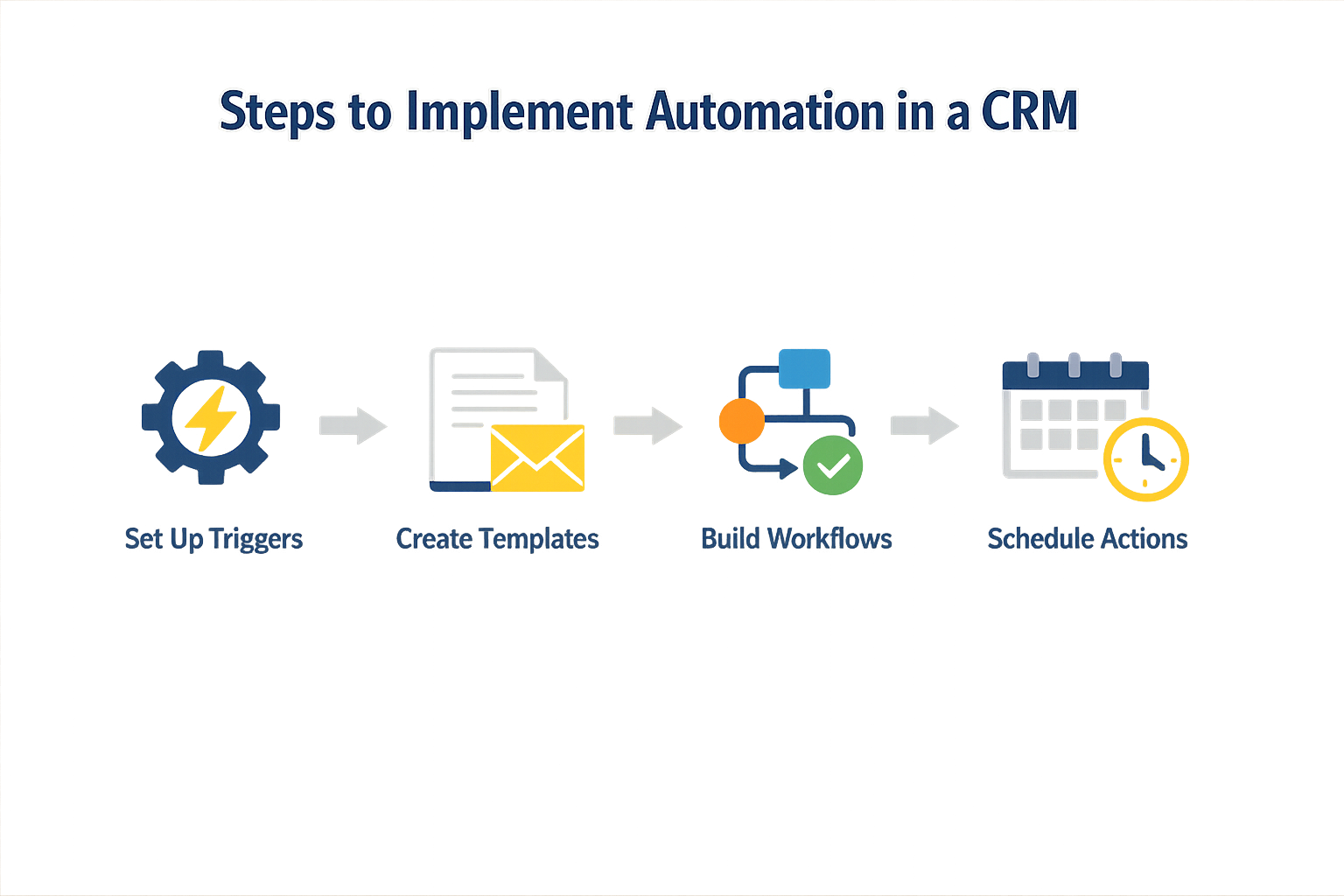
Implementing automation in your pressure washing business software requires a methodical approach. The systems that deliver the best results start with a clear inventory of what currently happens manually, then layer automation where it eliminates the most friction. The goal is not to automate everything at once — it is to automate the tasks that create the biggest operational drag when done by hand.
Step 1: Map Your Current Workflow
Before you configure any automation, document every touchpoint in your customer lifecycle. Start with the first inquiry and trace the path through scheduling, job completion, invoicing, and follow-up. Identify where information gets entered twice, where jobs wait for manual approvals, and where customers have to call you for updates they could retrieve themselves. This map becomes your automation priority list — the tasks that appear most often or cause the most delays are the ones to automate first.
Step 1
Audit manual tasks
List every task your team performs manually: answering booking calls, sending appointment confirmations, creating invoices, following up on unpaid balances. For each task, note how long it takes and how often it happens per week. The high-frequency, high-duration tasks are your automation targets.
Step 2: Enable Customer Self-Service Scheduling
Customer self-serve scheduling removes the back-and-forth of phone tag and frees your team to focus on completing jobs. Modern pressure washing business software includes booking interfaces customers can access directly — they see your availability, choose a time, and receive automatic confirmation. This feature alone can reduce inbound calls by half and eliminate the lag between a customer's decision to book and the actual appointment being set.
Step 3: Automate Estimates and Invoicing
Generating professional, branded proposals quickly is essential for closing jobs while the customer is still engaged. Configure your system to pull service history, equipment notes, and pricing templates so you can send a detailed estimate in minutes rather than hours. Once the job is complete, one-click invoicing with automatic payment reminders ensures you get paid faster without manual follow-up. Systems like Housecall Pro integrate scheduling, estimates, invoicing, and payments in one workflow, eliminating the need to re-enter data at each stage.
Step 2
Set up invoice automation
Configure your CRM to generate invoices immediately upon job completion, send them via email or SMS, and trigger reminders at 3 days, 7 days, and 14 days if unpaid. Attach payment links so customers can pay with a card or bank transfer without calling your office.
Step 4: Implement Dynamic Communication Workflows
Automated emails and SMS messages keep customers informed without requiring your team to send each one manually. Set up workflows that trigger based on events: booking confirmations, day-before reminders, post-job thank-you notes, and seasonal maintenance prompts. Use dynamic content that personalizes each message with the customer's name, service details, and appointment time. This approach maintains a high-touch feel while running entirely in the background.
For businesses ready to expand their automation strategy beyond CRM, small business automation frameworks offer a broader view of which workflows deliver the highest return when automated first. Operators running home service businesses can also explore marketing channel planning to coordinate customer acquisition with operational capacity.
Step 5: Track Service History for Personalized Follow-Up
Your CRM should automatically log every job, note, and equipment detail so you can reference past work without searching through paper files or scattered spreadsheets. This history enables personalized service reminders — if a customer had their driveway cleaned last spring, your system can send a reminder this spring without you lifting a finger. Equipment tracking at each property also speeds up quoting, since you already know what surfaces and square footage you are working with.
Using integrated customer self-serve scheduling can free up more capacity for your team, allowing them to focus on completing jobs effectively.
Step 6: Integrate Payment Processing
Payment friction is revenue friction. Integrate credit card and bank payment processing directly into your invoicing workflow so customers can pay the moment they receive the invoice. Offering instant financing options for larger jobs can also close deals that would otherwise stall. The faster you make it for customers to pay, the faster cash hits your account and the less time you spend chasing balances.
Step 7: Monitor and Refine Automation Rules
Automation is not a set-it-and-forget-it exercise. Review your workflows monthly to see which messages customers engage with, which reminders reduce late payments, and which scheduling features get used most. Adjust timing, wording, and triggers based on what the data shows. The systems that perform best are the ones that evolve as your business grows and customer behavior shifts.
What Are the Best Practices for Pressure Washing Business Software?
Automation only delivers value when it runs on clean data and clear rules. The features exist in most platforms; the difference between a system that saves time and one that creates new problems is how you configure it. These practices come from watching operators move from manual chaos to predictable workflows.
Start with Invoice and Payment Automation
One-click digital invoicing and automatic payment reminders eliminate the most repetitive admin work in a service business. Configure your pressure washing business software to send invoices immediately after job completion, then schedule reminders at three-day and seven-day intervals for unpaid balances. Offering multiple payment methods — credit card, bank transfer, and instant financing options — shortens the time between invoice and cash in the account. The system handles follow-up; you handle the work that generates revenue.
Track Service History to Automate Follow-Up
Service history tracking turns one-time customers into recurring revenue. When your system logs every job by property address, surface type, and service performed, it can trigger personalized reminders at the right interval — moss treatment customers get contacted in early spring, driveway maintenance customers hear from you before winter. The automation works because the data is specific: the system knows what was done, when, and what condition typically requires attention next. Generic "we miss you" emails do not book jobs; reminders tied to actual service cycles do.
Use Dynamic Content in Customer Communications
Customized emails and SMS messages that pull job details, technician names, and appointment times from the CRM drive higher engagement than static templates. When a message references the specific service booked and includes a direct link to approve an estimate or reschedule, customers act on it. Small business automation principles apply here: automate the delivery, personalize the content, and make the next step frictionless. A customer portal where clients can view past jobs, manage appointments, and pay invoices reduces the volume of inbound questions and speeds up the sales cycle.
The best automation is invisible to the customer and eliminates a recurring task for the operator.
Implement a Voice Agent for Common Questions
A voice agent grounded in your service knowledge can answer common questions about pricing, service types, and availability without human intervention. When the agent has access to live scheduling data, it can book assessments directly, converting inquiries into appointments while you're on a job site. The system only escalates complex questions or special requests to a person. This approach works when the voice agent is trained on the same service distinctions and rate structures published on your website — customers get consistent answers whether they call, text, or browse.
Monitor Performance Metrics to Refine Automation Rules
Real-time visibility into sales pipeline progress and individual performance metrics shows you where automation is working and where manual intervention still happens too often. Track the percentage of invoices paid within seven days, the conversion rate from estimate to booked job, and the average time between inquiry and first appointment. When a metric stalls, the automation rule needs adjustment — either the timing is wrong, the message is unclear, or the workflow has a gap. Pressure washing business software gives you the data; you decide what threshold triggers a change.
FAQ
What is pressure washing business software?Pressure washing business software is a specialized CRM and operations platform that automates scheduling, invoicing, routing, job tracking, and customer communication for pressure washing companies. It extends beyond contact management to handle the full service lifecycle from lead to payment.
How does automation improve profit margins in pressure washing?Automation reduces administrative overhead by eliminating manual data entry, optimizing routes to reduce fuel costs, accelerating payment cycles through automated invoicing and reminders, and preventing revenue leakage from missed follow-ups or scope creep.
Can customers book pressure washing appointments themselves?Yes. Modern pressure washing business software includes customer-facing booking portals where clients can view available time slots, select services, approve estimates, and schedule appointments without phone calls, compressing the sales cycle from days to hours.
What tasks should I automate first in my pressure washing business?Start with invoice generation and payment reminders, since these directly impact cash flow. Next, automate appointment confirmations and reminders to reduce no-shows. Then layer in route optimization and service history tracking to improve operational efficiency.
How does surface tracking prevent damage in pressure washing?Surface tracking documents the material type (composite siding, wood, concrete, masonry) and links it to the appropriate treatment protocol (soft wash vs. high-pressure). This prevents operators from applying damaging techniques to sensitive surfaces and reduces liability from improper cleaning methods.
Conclusion
Pressure washing business software delivers measurable gains when you automate beyond customer records. The systems that track scheduling, invoicing, routing, and field task completion generate the workflows that actually reduce overhead—personalized service becomes repeatable when the platform handles booking, proposal approval, and payment collection without manual handoffs. The data shows that productive workflows and better profit margins follow automation of the full sales cycle, from lead capture through close.
Implementation is not a one-time migration. You gain the most when you treat your CRM as a living system: configure automations incrementally, measure what changes after each deployment, and refine the rules based on what your team actually uses. The platforms that visualize every sales opportunity from lead to close give you the visibility to spot bottlenecks before they compound—missed opportunities shrink when the system surfaces them in real time.
Start with the task that consumes the most manual hours today. If your team spends afternoons reconciling invoices, automate payment workflows first. If scheduling conflicts burn morning hours, deploy route optimization next. The sequence matters less than the discipline of measuring time saved and reinvesting it into higher-value work. For service businesses looking to build repeatable growth systems, small business automation offers a framework for prioritizing which workflows to tackle first.
The pressure washing operators who treat their CRM as an operations platform—not just a contact database—report faster speed to cash and lower administrative drag. Your next job is already in the system; the question is whether the system is working it for you or waiting for you to work it manually.
Related reading
Sources(16)
- Local Service Business OS
- Xenco Labs — Sonoma Wash Co. case study
- Sonoma Wash Co. — Home page
- Housecall Pro
- FieldPulse
- Sonoma Wash Co.
- Sonoma Wash Co. — Pricing (rate card effective 2026-01-01)
- Google Business Profile guidelines
- ServiceTitan
- Stripe Documentation — Invoicing
- fieldpulse (competitive_claim)
- local-service-business-os (xl_local_os_editorial)
- sonoma-wash-co (shared_fact)
- housecall-pro (competitive_claim)
- pressure-washing-exterior-cleaning (vertical_workflow)
- sonoma-wash-co (shared_fact)
Written by
Xenco Labs Editorial
Published October 20, 2026 · 14 min read
The Xenco Labs editorial team writes about building and shipping AI products to production.
You Might Also Like
More from the Xenco Labs blog
Pressure Washing Software: What an Owner-Operator Actually Needs
Discover the pressure washing software owner-operators need for scheduling, invoicing, customer management, and efficient operations in 2025. Learn how pressure washing

Workflow Automation for Small Business
Discover what workflow automation for small business is and how to implement it for small business operations. Boost efficiency, save time, and streamline tasks.

How Much Does Small Business Automation Cost? Small Business Guide
Discover how much small business automation costs, including pricing factors, AI receptionist options, and budgeting strategies.

Field Service CRM: Service Business CRM vs Operating System: Key
Explore the key differences between field service CRM and Service Business Operating Systems to optimize your field service operations and growth.