
Content Audit: Content Refresh - How to Decide What to Keep, Update
Learn how to conduct a content audit and decide whether to keep, update, merge, expand, or retire your content for better performance.
Introduction
Your content library grows faster than you can manage it. Blog posts pile up, product pages multiply, and support articles age out of relevance while new ones launch. Within a year or two, you have hundreds of URLs — some performing well, many invisible, and a handful actively hurting your site's authority because they are thin, duplicative, or outdated.
A content refresh is the process that fixes this. It is a systematic examination of every published page to decide whether it still earns its place on your site. The outcome is not a report — it is a set of editorial decisions: which pages to keep as-is, which to update, which to merge with stronger pieces, which to expand into pillar content, and which to retire entirely. Done correctly, a content refresh improves search visibility, clarifies your site's topical authority, and reduces the maintenance burden of managing content that no longer serves a purpose.
We have run content audits across enterprise sites with thousands of pages and small service businesses with fifty. The pattern is consistent: sites that audit quarterly outperform sites that audit annually, and sites that never audit eventually plateau regardless of how much new content they publish. The work starts with business context — what you sell, who you serve, and what search behavior you want to capture — not with a spreadsheet of URLs. When you understand the business goal, the data tells you which content moves you toward it and which content is just occupying space.
The framework we use — keep, update, merge, expand, retire — is not a checklist. It is a decision tree that routes each URL to the editorial action that makes the most sense given its performance, its topical fit, and the effort required to fix it. A page with strong traffic but outdated facts gets updated. A page with no traffic and a topic covered better elsewhere gets retired or merged. A page with decent traffic and room to become a definitive resource gets expanded. The goal is not to touch every page — it is to touch the right pages in the right way.
This guide walks through the full process: how to pull the data, how to evaluate each page against the decision framework, and how to execute the editorial actions without breaking internal links or losing ranking equity. If you are planning a site migration, rebranding, or just trying to stop the content bloat before it becomes unmanageable, this is the system that gets you there. For teams deploying AI-assisted workflows or managing content operations at scale, understanding the principles here integrates cleanly with best practices for deploying AI web apps that rely on clean, well-structured content as input.
Problem Statement
Most organizations accumulate content faster than they can manage it. Pages multiply across campaigns, product launches, and seasonal pushes, but few teams track what still performs and what quietly drains authority. The result is a content library that looks healthy by volume but underperforms where it matters: traffic, conversions, and crawl efficiency.
Why Content Audits Fail Before They Start
The typical audit begins with good intentions — export a sitemap, sort by traffic, flag the zeros. Then reality hits. Teams discover duplicate titles across subdirectories, orphaned pages from retired campaigns, and canonical tags pointing to URLs that 301'd two migrations ago. Without a decision framework, the audit stalls in spreadsheet paralysis. You know something is wrong, but you cannot tell whether a low-traffic page is a problem to fix or a long-tail asset to protect.
The second failure mode is treating every page as equal. A homepage and a 2019 blog post do not deserve the same scrutiny, yet most audits apply uniform metrics — traffic, bounce rate, conversions — without acknowledging that different content types serve different functions. A technical reference page with 50 monthly visits may be more valuable than a listicle with 5,000 if those 50 visitors convert at 40%. Audit tools do not surface this nuance; they rank by volume and leave you guessing.
The Cost of Inaction
Leaving underperforming content in place is not neutral. Search engines allocate crawl budget per domain, and every low-value page competes with high-value pages for that budget. Outdated content also fragments authority: five mediocre posts on the same topic split backlinks and internal equity that one strong guide could consolidate. Worse, stale pages erode trust — a visitor who lands on a 2018 pricing page with a dead CTA form has learned that your site cannot be trusted for current information.
Updating or merging content eliminates redundancy and enhances the value of existing resources, directly improving performance where it counts.
The hidden cost is opportunity cost. Every hour spent maintaining content that does not contribute to business goals is an hour not spent on content that does. Without a repeatable process to identify what to keep, update, merge, expand, or retire, teams default to doing nothing — or worse, refreshing everything indiscriminately and burning budget on content that should have been retired months ago.
Solution Steps for a Content Audit
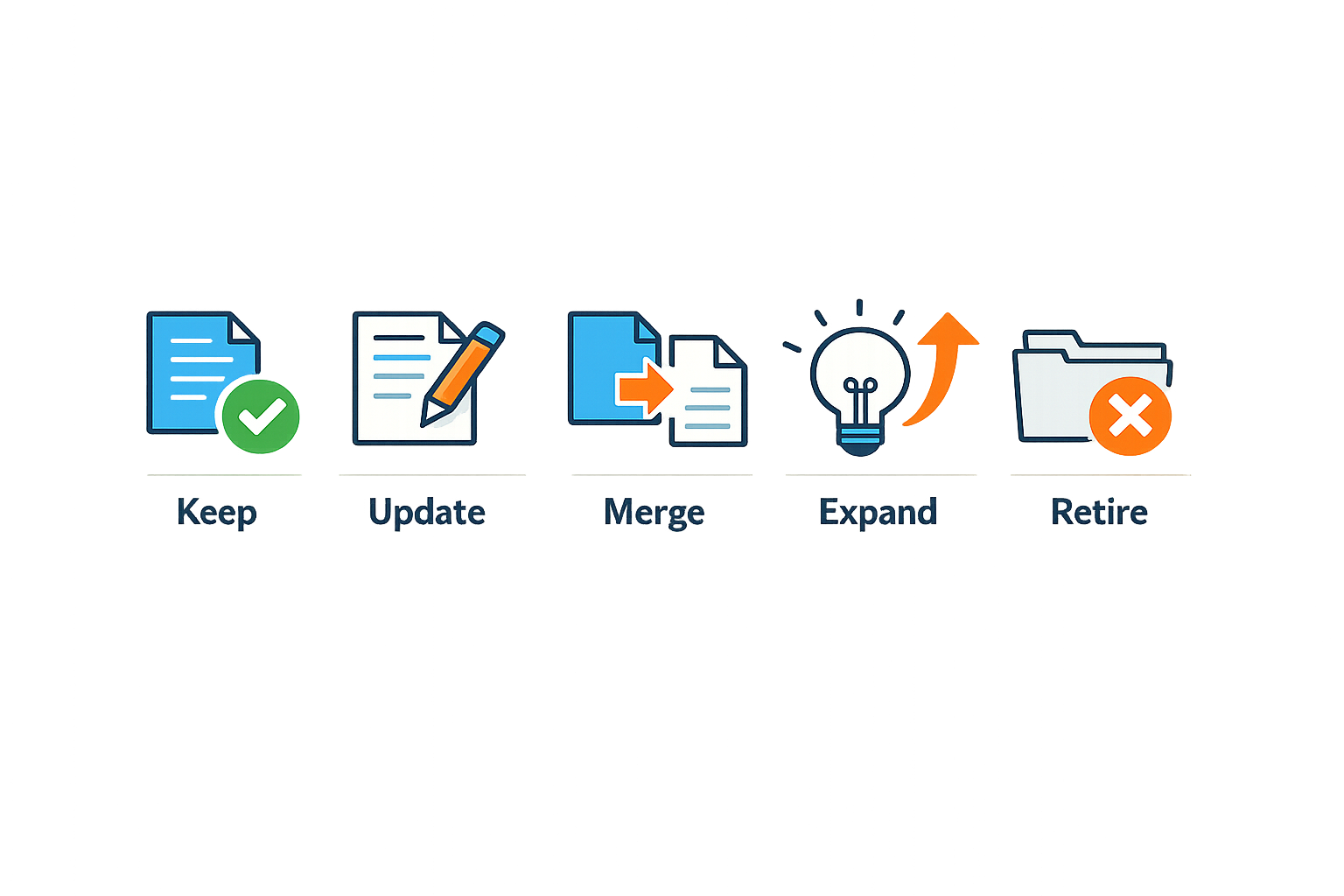
A systematic content refresh starts with inventory, not instinct. You need to see every page, measure its current state, and apply consistent decision criteria before you touch a single URL. The following steps walk you through the mechanics of auditing content and routing each piece to the right outcome.
Step 1: Build a Complete Content Inventory
Step 1
Export your full URL list
Pull every indexed page from Google Search Console or your sitemap. Include URL, title, last-modified date, and any metadata your CMS tracks. If you have analytics access, append sessions, entrances, and goal completions for the trailing twelve months. The goal is a single spreadsheet that shows what exists and how it performs.
Most organizations discover pages they forgot they published. Staging URLs that went live, duplicate category trees, archived campaign landing pages — all of it surfaces in a proper export. You cannot audit what you cannot see, so completeness matters more than speed at this stage.
Step 2
Collect performance and quality signals
For each URL, record organic traffic, conversion events, backlink count, and any engagement metric that reflects user value. Then add qualitative flags: does the page answer the query in the title? Is the information current? Does it duplicate another page's job?
This is where you separate signal from clutter. A page with zero traffic and zero backlinks after two years is not resting — it is retired in place. A page with high traffic but outdated screenshots or deprecated product names is a live liability.
Step 2: Classify Each Page by Content Refresh Action
Once you have the data, assign every URL to one of five buckets: keep, update, merge, expand, or retire. The decision tree is mechanical if you define thresholds in advance.
| Action | Trigger Condition | Outcome |
|---|---|---|
| Keep | Traffic stable, content accurate, no duplication | No change required |
| Update | Traffic declining or content outdated but topic valid | Refresh facts, screenshots, CTAs |
| Merge | Overlaps another page, thin content, low authority | Consolidate into stronger page |
| Expand | High engagement but incomplete coverage | Add sections, examples, depth |
| Retire | Zero traffic, topic obsolete, or deprecated offering | 301 redirect or remove from index |
Keep is reserved for pages that still do their job. If a guide ranks well, converts visitors, and reflects current reality, leave it alone. Unnecessary rewrites burn time and risk ranking drops.
Update applies when the structure works but the facts have drifted. Product pricing changed, a UI was redesigned, a regulation was amended — the page needs a refresh, not a rewrite. Focus on accuracy and recency signals: dates, version numbers, screenshots, and links to external references that may have moved.
Merge is the right move when two pages compete for the same query or when a thin page cannot stand alone. Combine the content into the stronger URL, then 301 the weaker one. This consolidates authority and eliminates the risk that search engines split traffic between near-duplicates.
Expand is appropriate when engagement metrics show interest but the content does not fully satisfy the query. If users land on a page and immediately search again, or if the average time on page is high but conversions are low, the topic is right but the coverage is incomplete. Add examples, comparison tables, or step-by-step breakdowns that close the gap.
Retire is the hardest decision and the most necessary. Pages tied to discontinued products, expired campaigns, or topics your organization no longer supports should be removed from the index or redirected to a relevant replacement. Keeping dead content live dilutes crawl budget and confuses users who expect current information.
Step 3: Prioritize by Impact and Effort
You now have a list of actions, but you cannot execute them all at once. Rank each page by potential impact — traffic volume, conversion rate, strategic importance — and estimated effort. High-impact, low-effort updates go first. Pages that require legal review, new design work, or subject-matter-expert input go into a separate queue with longer lead times.
The cheapest content refresh is the one that moves the metric you already track — start with pages where a small change produces a measurable result.
This prioritization prevents the audit from stalling in analysis. If you wait until every page is perfect, you will never ship the first update. Instead, batch the work: update ten high-traffic pages this month, merge five thin pieces next month, retire the obsolete archive in the third cycle. Incremental progress beats a comprehensive plan that never executes.
Step 4: Execute and Document Changes
As you update, merge, or retire content, log every change in your inventory spreadsheet. Record the date, the action taken, the old URL (if applicable), and the new destination. This change log becomes your audit trail when you review performance three months later and need to know which pages were touched.
For updates, refresh the last-modified date in your CMS and consider adding a brief changelog at the bottom of the page if the changes are material. For merges, ensure the 301 redirect is in place and that the destination page incorporates the best elements of both sources. For retirements, confirm that the URL returns a 410 (Gone) or redirects to a contextually appropriate alternative — never let it 404 indefinitely.
If you need a structured framework for deploying these changes at scale, best practices for deploying AI web apps covers version control, testing, and rollback procedures that apply equally to content operations.
Step 5: Measure and Iterate
Three months after the first batch of changes, compare traffic, rankings, and conversions against the pre-audit baseline. Pages that improved validate your decision criteria; pages that declined or flatlined indicate a misjudgment in classification or execution. Use that feedback to refine the thresholds for your next audit cycle.
Content audits are not one-time projects. Plan to repeat the inventory and classification process annually, or whenever a major site migration, product launch, or algorithm update changes the landscape. The goal is a continuous content refresh cycle where underperforming pages are identified and addressed before they become long-term liabilities.
Tips and Tricks for Effective Content Audits
A successful content refresh depends on consistent evaluation criteria and a willingness to make hard calls. The following strategies help you move from inventory to action without second-guessing every decision.
Focus on Quality Over Quantity
When cataloging metadata or structured data, resist the temptation to fill every available field. It is more important to supply fewer but complete and accurate properties rather than trying to provide every possible recommended property. The same principle applies to content itself: a tight, well-sourced article that answers one question thoroughly outperforms three shallow posts that skim the surface.
Use a People-First Evaluation Checklist
Before marking any page for update or retirement, ask whether you are creating people-first content. Google's guidance centers on a simple test: Do you have an audience that finds your content valuable? Does your content demonstrate first-hand expertise? Will readers leave feeling they have learned enough to accomplish their goal?
If a page fails any of those questions, it belongs in the update or retire column. If it passes all three but underperforms, the issue is likely distribution or technical—not the content itself.
Content that's created primarily for people, and not to manipulate search engine rankings, is the foundation of a sustainable content strategy.
Assess Production Quality
Even strong ideas fail when execution is sloppy. During your audit, note whether the content appears hastily created: inconsistent formatting, missing images, broken internal links, or vague headings all signal low production value. Pages that look unfinished erode trust, regardless of the underlying information.
Mark these for update with a production pass—fix formatting, add relevant visuals, tighten headings, and verify all links resolve. Often a page needs polish more than it needs new paragraphs.
Avoid Cosmetic Freshness Signals
Changing publication dates to make older content appear new without substantive updates is a red flag. If you are adjusting timestamps primarily because you believe it will help search rankings, you are optimizing for the wrong signal. Freshness matters when the information has genuinely changed; otherwise, leave the date alone and focus on whether the content still serves its original purpose.
Integrate Your Audit with Deployment Practices
Content audits do not end when you publish the refresh. Monitor validity after deployment to catch broken structured data, redirect chains, or pages that degrade over time. For teams managing best practices for deploying AI web apps, the same version-control and testing discipline applies: treat content as code, track changes, and validate before and after release.
Conclusion
A content refresh is not a one-time project — it is a repeating discipline that keeps your site aligned with how people search and what they expect to find. The framework outlined here (keep, update, merge, expand, retire) gives you a decision tree that works whether you are reviewing ten pages or ten thousand. The goal is not to maximize page count or to chase every trend; it is to ensure that every asset on your site either serves your audience or gets out of the way.
Regular content audits prevent the drift that happens when teams publish without retiring, when updates pile up as new URLs instead of replacing old ones, and when no one asks whether a page still deserves to rank. When you build this process into your quarterly or semi-annual rhythm, you catch problems before they compound — duplicate content that confuses search engines, outdated claims that erode trust, and thin pages that dilute your domain authority.
The mechanics are straightforward: export your analytics and crawl data, score each URL against traffic and engagement thresholds, apply the five-decision framework, and execute the changes with proper redirects and canonical tags. The discipline is in doing it consistently and in resisting the urge to keep everything just because it once performed. People-first content means content that remains useful to the person who lands on it today, not content that was useful three years ago and has been untouched since.
If you are managing content operations at scale, the principles here extend to other systems — best practices for deploying AI web apps follow the same logic of maintaining only what serves a current need and retiring what does not. Start your next content refresh with a clear inventory, a shared decision framework, and a commitment to act on what the data tells you. Your audience will notice the difference, and so will your search performance.
Frequently asked questions
How often should I run a content refresh?
Quarterly audits work best for active sites publishing weekly or more; annual audits suffice for smaller libraries. Major site changes (migrations, rebrands, product launches) always justify an immediate content refresh cycle.
What metrics determine whether to keep or retire a page?
Zero organic traffic after 12 months, zero backlinks, and obsolete topic coverage signal retirement. Pages with stable traffic, current information, and no duplication earn a keep decision.
Should I delete pages or redirect them?
Redirect retired pages with a 301 to the most relevant current content. Only use 410 (Gone) for pages with no logical successor, such as discontinued product lines with no replacement.
How do I avoid losing search rankings during a content refresh?
Preserve URL structure when updating; use 301 redirects for merged or retired pages; maintain internal link equity; and never delete pages with inbound links without redirecting them first.
Can a content refresh improve conversion rates?
Yes. Removing outdated CTAs, consolidating scattered information into single authoritative pages, and ensuring accurate product details all directly improve conversion performance.
Related reading
How to Get More Google Reviews: Google Review Link Without Breaking
SEO Forecasting: SEO KPIs & Forecasting: Build a Search Forecast
Sources(10)
- Google Search Central documentation
- Google Search Central documentation
- Google Search Central documentation
- Google Search Central documentation
- Google Search Central — AI features and your website
- Google Search Central documentation
- Google Search Central documentation
- Google Search Central — Spam policies for Google web search
- Google Search Central documentation
- Office of Homeless Solutions - SanDiegoCounty.gov
Written by
Xenophon Giannis
Published October 18, 2026 · 15 min read
Xenophon Giannis is the founder and CEO of Xenco Labs, where he designs, builds, deploys and operates production AI software solo — on his own multi-node cluster, with his own LLM gateway and automation infrastructure. Twenty-five years in enterprise technology came first: a decade at AboveNet, hired as its first sales rep after bankruptcy and promoted until he ran the entire Western Pacific region, then sales leadership at Black Lotus and Nexusguard in DDoS mitigation. He writes about what he actually ships, and what actually breaks in production.
You Might Also Like
More from the Xenco Labs blog

Lead Generation for IT Companies: Enterprise Strategies
Learn effective lead generation for IT companies and infrastructure strategies, turning search demand into a strong sales pipeline.
Geo vs SEO: AEO vs SEO: Key Changes for Search Teams (+ GEO Explained)
Explore the differences between AEO vs SEO and GEO, and understand what changes for search teams and what remains the same in modern search optimization. Learn about geo

SEO Manager Job Description: In-House vs Agency
Explore in-house SEO vs agency options through the SEO Manager job description, covering key responsibilities and when each approach fits your organization.
SEO Content Brief to Published Page: Content Operations Workflow
Explore the content operations workflow from seo content brief to published page, ensuring efficiency and quality at every stage.